내 인스타 프로필에서 'AI 나'가 튀어나오는 릴스 — 프롬프트 전부

프로필 사진 속 내가 화면 밖으로 기어 나와 팔로워 숫자를 지우고 허세를 부리는 20초 릴스, 만든 방법과 프롬프트를 그대로 공개해요.

완성본 — 「3K의 반란」 (20초)

프롬프트는 영어 원문 그대로 실었어요. [NAME]처럼 대괄호로 된 칸만 내 것으로 바꿔 쓰세요.

0. 완성본 흐름 (세로 9:16, 4컷)

컷시간장면영상 길이
컷 10~3초프로필 사진 동그라미에서 기어 나와 화면 위로 뛰어내림4초
컷 23~8초뒷모습. 팔로워 숫자를 소매로 문질러 지우고 손가락으로 '30K'를 씀 → 숫자가 '툭' 원래대로 돌아옴 → 허리에 손6초
컷 38~12초돌아서서 머리를 긁적이며 "어, 아직 3K네요."4초
컷 412~20초컷 3과 같은 구도로 이어서 감사 인사 + 경례8초

1. 준비물

  • 내 인스타 프로필 화면 캡처 한 장(휴대폰 스크린샷 그대로).
  • 내 얼굴이 잘 보이는 사진 2장: 얼굴 정면 1장, 전신이나 상반신 1장. 옷은 영상에 나올 옷으로 고르세요. 검은 셔츠처럼 단순한 옷이 컷마다 덜 바뀌어요.
  • Google Flow: 시작 그림은 Nano Banana Pro, 영상은 Omni(Veo 계열)를 써요. 영상은 크레딧이 들어요(7번 참고).
  • 편집 프로그램: CapCut, 프리미어 등. 숫자·손글씨·자막은 편집에서 얹어요.
  • (선택) 내 목소리 클론: 없으면 Omni가 대사까지 만들어 준 소리를 그대로 써도 돼요.

2. 내 캐릭터부터 고정하기 (가장 중요)

컷을 만들 때마다 얼굴이 조금씩 바뀌어요. 저희도 첫 판에서 컷 3개의 얼굴이 모두 달랐어요.

  • Flow에 내 얼굴 사진 2장을 재료(ingredient)로 올리고 이름을 붙이세요. 예: [NAME]
  • 모든 컷에 이 캐릭터를 같이 넣어요. 프롬프트에도 이름을 꼭 써요.
  • 프롬프트 끝에는 항상 아래 문장을 붙여요. AI가 얼굴을 늙게 만들거나 피부를 태우는 버릇이 있어서예요.

얼굴 지키는 문장

His face exactly like [NAME]: do not age him, no extra wrinkles, no grey hair, no tan.

3. 시작 그림 만들기 (Nano Banana Pro)

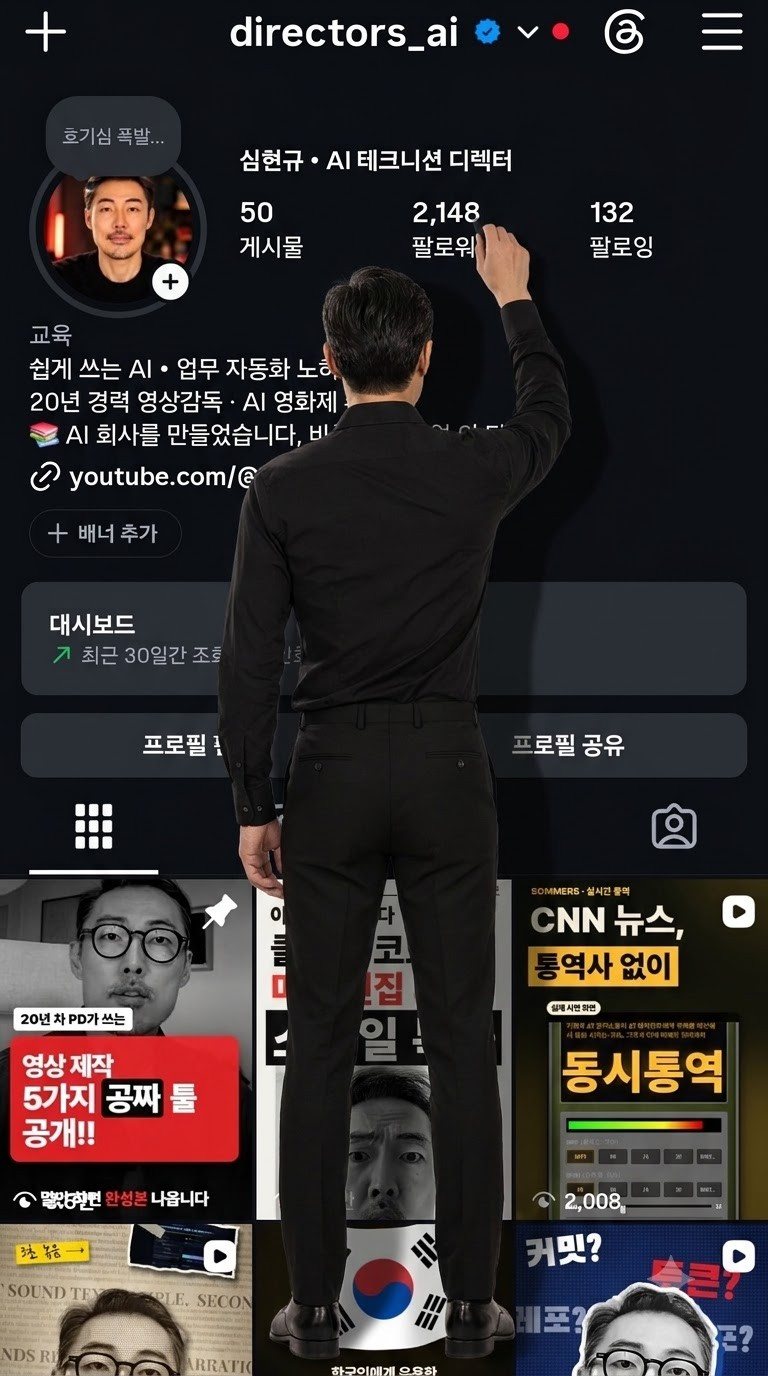
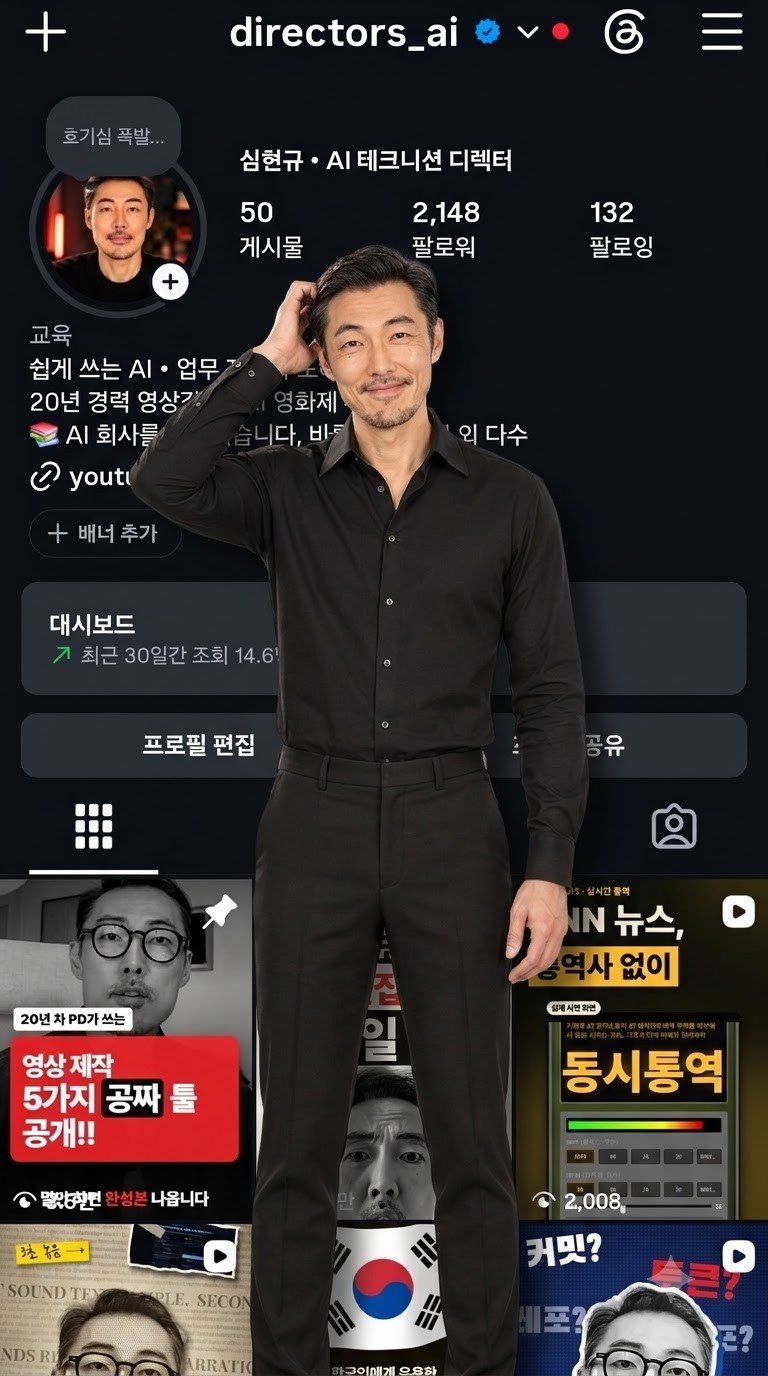
재료로 프로필 캡처 + 내 캐릭터를 함께 넣어요. 모두 "캡처가 화면 전체를 가득 채우고, 그 앞에 진짜 사람이 서 있는" 그림이에요. 여러 장 뽑아서 얼굴이 제일 닮은 것을 고르세요.

그림 1 — 프로필 동그라미에서 나오는 중
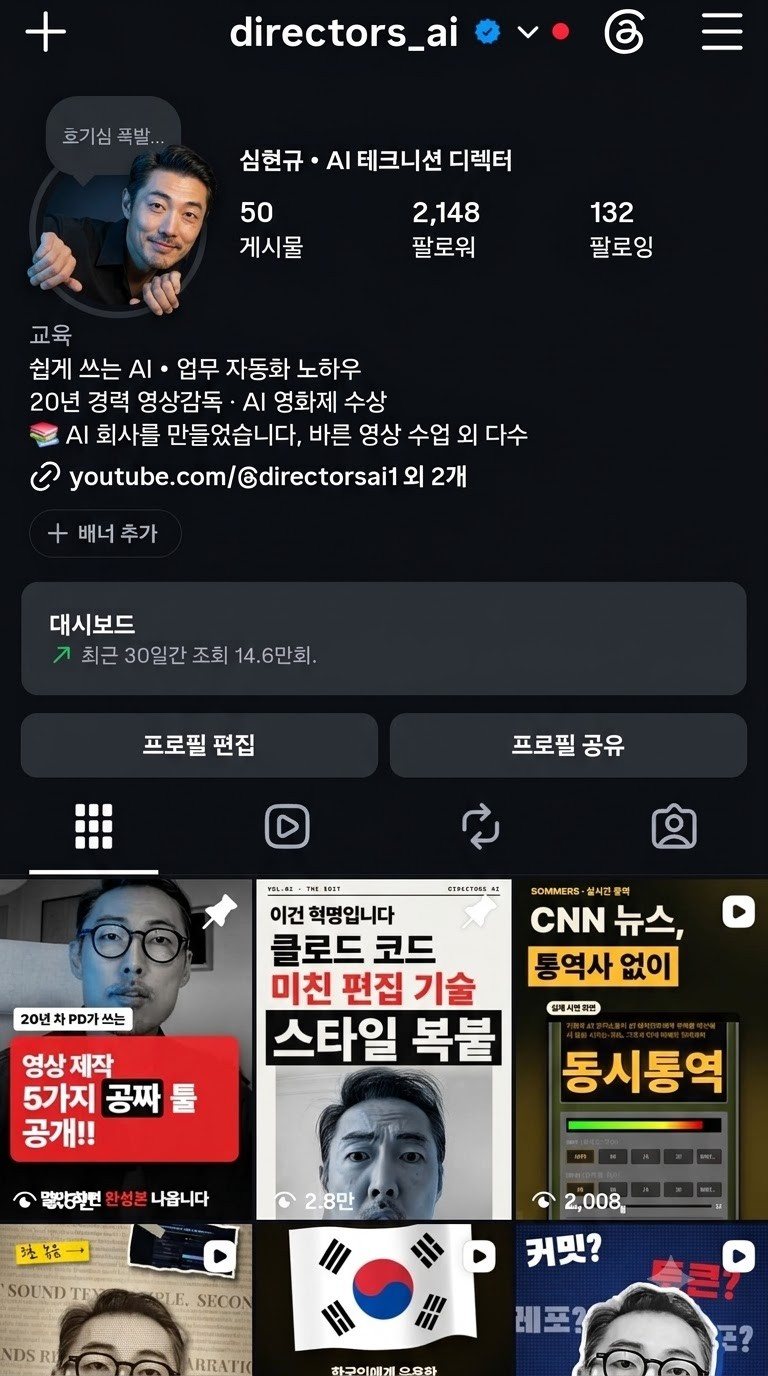
인스타 프로필 화면의 동그란 프로필 사진에서 사람이 몸을 내밀며 나오는 시작 그림 (AI 생성)
시작 그림 1 (AI 생성)

그림 1 프롬프트

Vertical 9:16. The Instagram profile screenshot image fills the ENTIRE frame edge to edge, flat and front-on, exactly as in the screenshot: same dark theme, same layout, same Korean text, same numbers, do not redraw or change anything on it. [NAME] is climbing OUT of the round profile photo at the top-left, as if the circle were a hole in the screen: his head, shoulders and both arms have come out of the circle toward the camera, his hands grip the rim of the circle, his face is turned to the camera with a curious, playful smile. He is real and three-dimensional, photorealistic skin and black shirt, lit by the cool glow of the screen from below and a soft warm key light from the front. He casts a real soft shadow onto the screen around the circle. His face exactly like [NAME]: do not age him, no extra wrinkles, no grey hair, no tan. No extra text, no watermark.

그림 2 — 뒷모습, 숫자를 소매로 문지르기

프로필 화면 앞에 선 사람의 뒷모습, 팔을 들어 팔로워 숫자를 소매로 문지르는 시작 그림 (AI 생성)
시작 그림 2 (AI 생성)

그림 2 프롬프트

Vertical 9:16. The Instagram profile screenshot image fills the ENTIRE frame edge to edge, flat and front-on, exactly as in the screenshot: same dark theme, same layout, same Korean text, same numbers, do not redraw or change anything on it. [NAME] has stepped out of the screen and stands in front of it, full body, seen from behind, black shirt, black trousers, black shoes, his feet at the bottom of the frame. He reaches up with his right arm and rubs the follower count [FOLLOWERS] with his shirt sleeve. He is real and three-dimensional, photorealistic, lit by the glow of the screen, which outlines his hair and shoulders. He casts a real soft shadow onto the screen behind him, slightly to the right. Natural proportions, the follower count stays fully visible next to his sleeve. No extra text, no watermark.

그림 3 — 돌아서서 머쓱하게

프로필 화면 앞에서 카메라를 보며 머리를 긁적이는 사람의 시작 그림 (AI 생성)
시작 그림 3 (AI 생성)

그림 3 프롬프트

Vertical 9:16. The Instagram profile screenshot image fills the ENTIRE frame edge to edge, flat and front-on, exactly as in the screenshot: same dark theme, same layout, same Korean text, the follower count [FOLLOWERS] clearly visible, do not redraw or change anything on it. [NAME] stands in front of the screen facing the camera, shown from the knees up, black button-up shirt and black trousers, scratching the back of his head with one hand and giving a sheepish, slightly embarrassed smile straight into the camera. He is real and three-dimensional, photorealistic, lit by a soft warm key light from the front and the cool glow of the screen behind him as a rim light on his hair and shoulders. He casts a real soft shadow onto the screen behind him. His face exactly like [NAME]: do not age him, no extra wrinkles, no grey hair, no tan. No extra text, no watermark.

그림 4 — 따로 만들지 않아요

컷 4는 컷 3 영상의 마지막 프레임을 캡처해서 시작 그림으로 써요(4번 참고). 처음에는 가슴 위만 나오는 바스트샷을 따로 만들었는데, 구도가 갑자기 바뀌어서 이야기가 끊겼어요. 같은 구도로 이어 가는 편이 훨씬 자연스러웠어요.
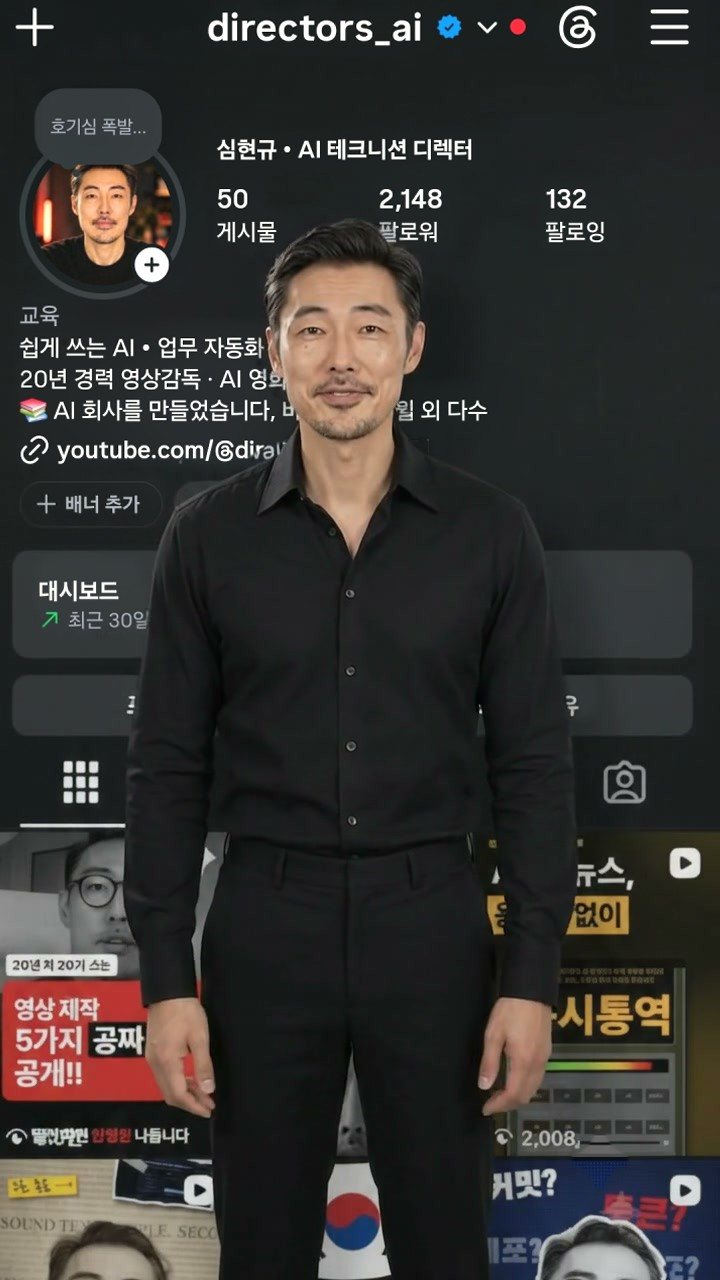
컷 3 영상의 마지막 장면을 캡처한 그림 — 같은 사람이 같은 자리에서 정면을 보고 서 있음 (AI 생성)
컷 3 영상의 마지막 프레임 (AI 생성)

4. 영상 4컷 만들기 (Flow Omni, 720p)

컷 1 — 기어 나와서 뛰어내리기 (4초, 시작 그림 1 + 캐릭터)

컷 1 프롬프트

Start exactly from the scene image as the first frame: the dark Instagram profile screen fills the whole frame and [NAME] has his head, shoulders and arms out of the round profile photo at the top-left. Static locked-off camera, the profile screen stays perfectly still and flat, every letter and number on it stays unchanged. [NAME] pushes on the rim of the circle, pulls his whole body out of the profile photo toward the camera, swings his legs out and hops down, landing lightly on his feet on the lower part of the screen, then straightens up and turns his back to the camera, facing the follower count. He is a real, three-dimensional person, photorealistic, lit by the screen glow, casting a soft shadow on the screen. His face stays exactly like [NAME] the whole time: do not age him, no grey hair, no tan. Sound: a soft whoosh and a light landing thump, no music, no speech. No text added, no subtitles.

팁: 끝부분에서 몸이 앞뒤로 '휙' 뒤집히는 일이 많아요. 착지하는 순간에서 잘라 바로 컷 2로 넘기세요.

컷 2 — 숫자 지우고 쓰는 시늉 (6초, 시작 그림 2, 프레임 모드)

뒷모습이라 얼굴이 안 보이니 프레임 모드로 하세요. 재료(캐릭터) 모드로 했더니 AI가 프로필 화면을 새로 지어내 버렸어요.

컷 2 프롬프트

Static locked-off camera. The dark Instagram profile screen behind him stays perfectly still and flat, exactly as in the first frame: every letter, number and thumbnail stays unchanged, do not redraw the screen. The man in the black shirt, seen from behind, keeps his face turned away from the camera the whole time. Timing: from 0.5 to 1.5 seconds he rubs the follower count [FOLLOWERS] hard with his shirt sleeve, side to side. From 1.7 to 3.4 seconds he writes slowly with his right index finger right on that spot, three big strokes from left to right, his fingertip touching the screen and clearly visible. Around 3.6 seconds he lowers his arm, steps back half a step and at 4.5 seconds puts both hands on his hips, proud, head tilted up at his work. Real, three-dimensional person, photorealistic, lit by the screen glow, soft shadow on the screen. Do not draw any letters or numbers. Sound: squeaky rubbing, a light finger squeak, no music, no speech. No subtitles.

팁: 몇 초에 무엇을 하는지 초 단위로 적으면나중에 손글씨를 맞추기가 쉬워요. 그래도 AI가 손가락 자리에 흰 글씨(저희는 'W.lc')를 그려 넣는 경우가 있어요. 편집에서 그 자리를 덮고 노란 손글씨를 얹으면 돼요.

컷 3 — 돌아서서 "어, 아직 3K네요" (4초, 시작 그림 3 + 캐릭터)

컷 3 프롬프트

Start exactly from the scene image as the first frame: the dark Instagram profile screen fills the whole frame and [NAME] stands in front of it facing the camera, knees up, scratching the back of his head. Static locked-off camera, the profile screen stays perfectly still and flat, every letter and number on it stays unchanged. He glances up over his shoulder at the follower count, looks back into the camera with a sheepish, embarrassed smile, gives a small shrug and says in Korean in a calm, slightly low voice: "어... 아직, [N]K네요." Natural lip movement for every syllable. He is a real, three-dimensional person, photorealistic, warm key light from the front and screen glow as rim light, soft shadow on the screen behind him. His face stays exactly like [NAME] the whole time: do not age him, no grey hair, no tan. No music. No subtitles, no text added.

컷 4 — 같은 구도로 이어서 인사 + 경례 (8초, 컷 3 마지막 프레임, 프레임 모드)

컷 4 프롬프트

Continuous shot, locked-off static camera. Keep the exact framing of the first frame from start to end: no zoom, no push-in, no cut, no camera movement. The same man stands in the same spot, full figure visible as in the first frame, in front of the same still Instagram profile screen. The background stays completely unchanged and motionless. His face, hair, moustache and black shirt stay identical to the first frame. He looks into the camera with a warm, slightly sheepish smile and speaks in natural, calm, friendly Korean, no pauses longer than a breath: "[실제 팔로워 수] 분, 진심으로 감사합니다. 댓글에 에이아이 남기시면 프롬프트 드려요. [목표]케이 되는 날, 또 찍을게요!" Actions in order: on the thanks he places his right hand on his chest and gives a small nod; on the comment line he lowers the hand and points down with one finger toward the bottom of the screen; on the last line he smiles wider, and right after the last word he raises his right hand to his brow in a relaxed two-finger salute, holds it with a confident smile, eyes blink naturally. The dialogue finishes by 7 seconds. Natural body weight shifts, relaxed shoulders. No text, no subtitles, no logos added, no music.
  • 대사 속 숫자는 소리 나는 대로 한글로 써요. 예: 삼천이백구, 에이아이, 써티케이.
  • The dialogue finishes by 7 seconds를 넣어야 경례할 시간이 남아요.
  • 프레임 모드에는 캐릭터를 붙일 수 없어요. 만든 뒤에 컷 3 끝 얼굴과 나란히 놓고 닮았는지 꼭 확인하세요.

이 자료를 만든 저희가 직접 만든 것
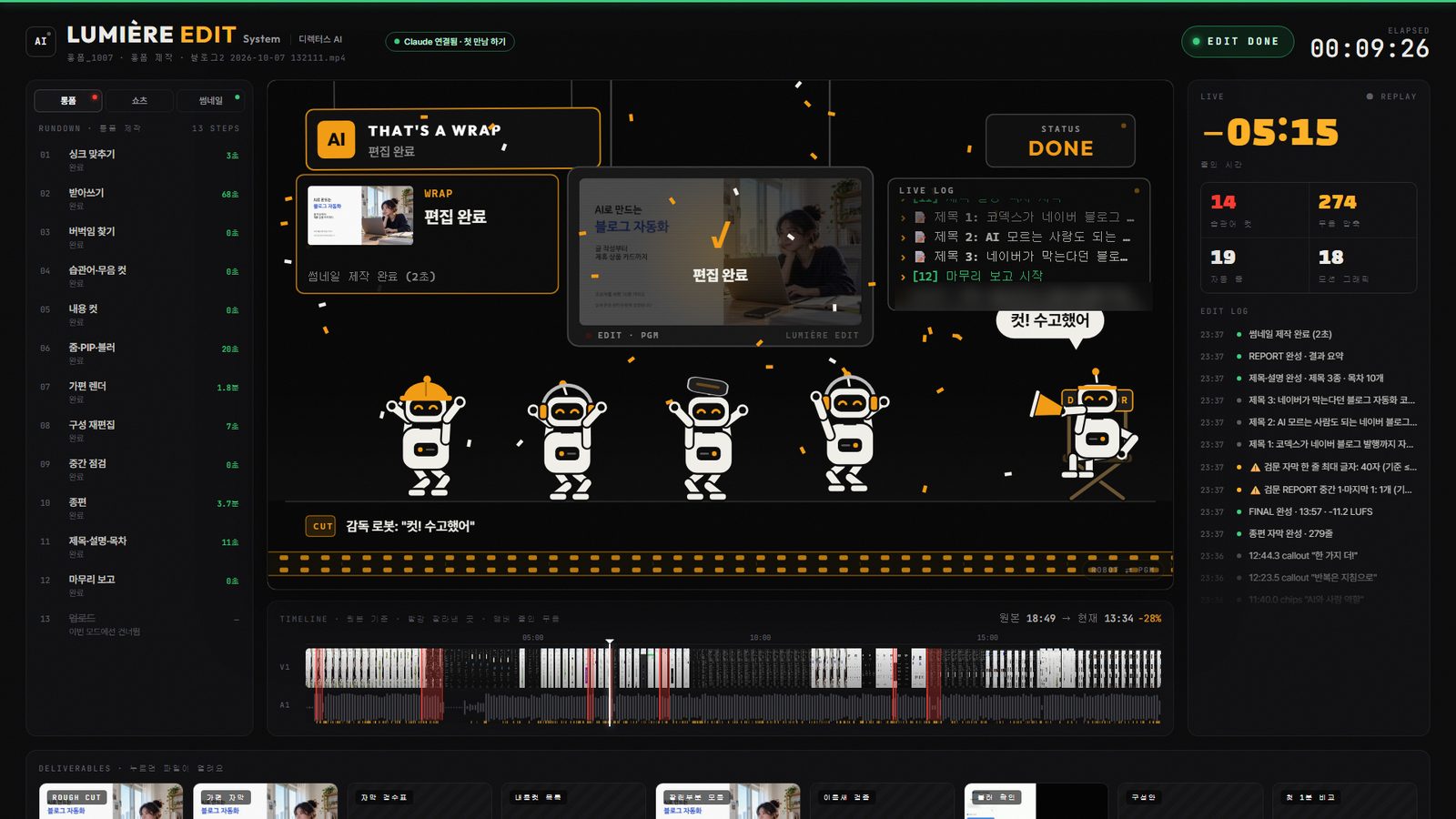
뤼미에르 편집 화면 — 로봇 편집팀이 편집 완료를 알리는 장면
LUMIÈRE BETA · AI 영상 편집촬영본만 넣으면 컷·자막·썸네일까지, 말로 하는 영상 편집단계마다 품질 검사를 붙여 자동으로 돌려 주는 편집 시스템이에요. 쓸수록 내 스타일로 자라요.정가 ₩200,000₩99,000베타 20명 선착순Claude Pro 이상 구독 별도 · 윈도우 전용 · 한국어 영상뤼미에르 베타 보기 →
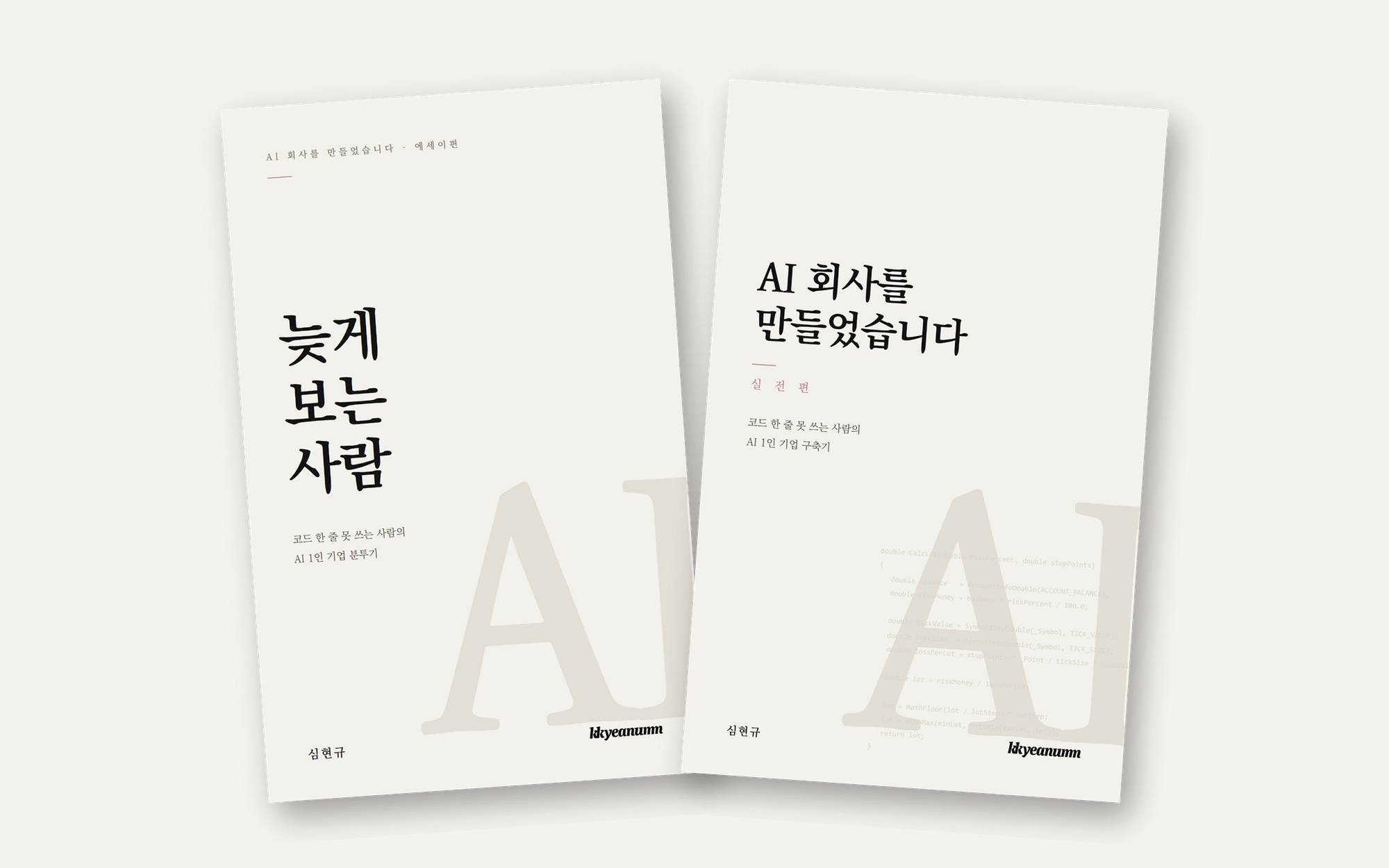
『늦게 보는 사람』과 『AI 회사를 만들었습니다』 전자책 표지
E-BOOK · PDF 2권 세트『AI 회사를 만들었습니다』 + 『늦게 보는 사람』코드를 못 쓰는 PD가 AI 에이전트와 회사를 만든 넉 달의 기록. 실제 프롬프트를 풀어 쓴 실전편(155쪽)과 에세이편(143쪽).₩18,000결제 즉시 다운로드전자책 보기 →

뤼미에르 가격에 Claude 이용료는 포함되지 않습니다. Claude는 Anthropic의 상표이며, 뤼미에르는 Anthropic과 제휴하거나 보증받은 제품이 아닙니다.

5. 목소리

  • 가장 쉬운 방법: 컷 3·4에서 Omni가 입 모양과 함께 만든 소리를 그대로 써요.
  • 내 목소리로 하려면: 보이스 클론으로 같은 대사를 만들어서 덮어요. 이때 지킬 세 가지가 있어요.
  • ① 마지막 문장 뒤에 버릴 문장을 하나 더 붙여서 만드세요. 예: "오늘도 끝까지 봐 주셔서 고맙습니다." 클론 모델은 글의 맨 끝을 뚝 자르는 버릇이 있어요. 만든 뒤 진짜 마지막 말과 버릴 문장 사이 조용한 곳에서 잘라 내요.
  • ② 말소리 안쪽은 절대 자르지 마세요. 입 모양에 맞추려고 문장 경계를 짐작해 자르면 첫 글자("어")나 끝 글자가 잘려요. 문장 사이의 조용한 쉼만 늘리거나 줄여서 맞춰요.
  • ③ 영상은 마지막 말 뒤에 0.6~1초 여유를 두고 끝내요. 바로 끊으면 잘린 느낌이 나요.
  • 내 목소리를 복제했다면 올릴 때 인스타의 'AI 정보' 표시를 켜 주세요.

6. 편집 — 글자는 AI가 아니라 편집에서

AI 영상 속 한글은 거의 반드시 뭉개져요. 팔로워 → '팔로위', 이름 오타 같은 식이에요. 웃음 포인트인 숫자 개그는 편집에서 정확하게 얹어요.

숫자 개그 타이밍 (컷 2 기준)

시각할 일
0.8~1.5초소매가 지나가는 동안 원래 숫자를 옆으로 번지게 지우기(블러 + 마스크)
1.7~3.4초손가락 끝을 따라 노란 붓글씨 '30K'가 써지게(마스크로 왼쪽부터 드러내기)
약 4.8초30K가 부르르 떨리기
약 5.0초30K가 '툭' 떨어지고, 원래 숫자가 뿅 튀어 돌아옴(효과음: 툭 + 뿅)
  • 글씨가 손가락 뒤에 써져야 진짜처럼 보여요. 손은 누끼(배경 지우기)로 따서 글씨 위에 올려요.
  • 컷 3 자막: "아직… 3K네요"
  • 컷 4: 노란 손글씨 "3,209분, 진심으로 감사합니다" → 댓글창이 올라오며 'AI'가 타이핑됨 → "30K 되는 날, 또 찍을게요!"
  • 자막은 화면 아래 1/4 위쪽에 둬요. 인스타 아래쪽 버튼들에 가려지지 않게 하기 위해서예요.

(고급) 뒤 프로필 화면을 진짜 캡처로 바꾸기

뭉개진 한글이 신경 쓰이면, 프레임마다 사람만 누끼로 따고 뒤 화면을 원래 캡처로 다시 까는 방법이 있어요. 숫자가 바뀌었을 때도 영상을 다시 찍지 않고 새 캡처로 바꿀 수 있어요. 저희는 2,148명 판에서 3,209명 판으로 크레딧 0으로 바꿨어요.

해 보면서 겪은 함정:

  • 검은 옷 + 어두운 화면 = 팔이 사라져요. 누끼 모델 하나(u2net_human_seg)만 쓰면 허리에 얹은 팔이나 머리 짚는 팔의 검은 소매를 놓쳐요. 두 번째 모델(isnet-general-use)을 함께 돌려 큰 값을 쓰니 팔이 살아났어요.
  • 두 번째 모델은 팔과 몸 사이 틈까지 사람으로 잡아요. 그 틈은 다시 화면으로 돌려야 해요.
  • 손끝·손톱·얼굴 하이라이트는 '밝고 색 없는 곳'이라 글자로 오인되기 쉬워요. 누끼 안쪽은 지우지 마세요.
  • AI가 그린 화면과 진짜 캡처는 밝기가 조금 달라요. 밝기를 맞출 때 흰 글씨처럼 튀는 점은 빼고 재야 얼룩이 생기지 않아요.
  • 작업이 끝나면 밝기를 올린 장면을 0.5초 간격으로 뽑아 팔·손끝·머리카락이 지워진 곳이 없는지 확인하세요.

7. 크레딧과 시간 (저희 실제 기록)

  • 시작 그림(Nano Banana Pro): 0크레딧. 여러 장 뽑아 고르기.
  • 영상(Omni 1.1 Flash 720p): 4초 7 · 6초 10 · 4초 7 · 8초 12 = 완성본에 쓴 컷만 36크레딧. 재시도와 버린 컷까지 합치면 이보다 훨씬 많이 들었어요.
  • 가장 오래 걸린 곳은 영상 생성이 아니라 편집(숫자 개그 타이밍, 글자 바로잡기)이었어요.

8. 자주 막히는 곳

문제해결
컷마다 얼굴이 다름모든 컷에 내 캐릭터를 넣고, 'do not age him…' 문장을 붙여요
재료 모드에서 프로필 화면을 AI가 새로 지어냄뒷모습 컷은 프레임 모드로
컷 끝에서 몸이 앞뒤로 휙 뒤집힘착지·멈춘 순간에서 잘라 다음 컷으로
마지막 컷만 구도가 달라 어색함앞 컷의 마지막 프레임을 시작 그림으로 이어 찍기
AI가 화면에 이상한 글자나 숫자를 그림Do not draw any letters or numbers + 글자는 편집에서
목소리 첫 글자·끝 글자가 잘림버릴 문장 하나 더 + 말소리 안쪽은 자르지 않고 쉼만 조정
합성 후 팔·손끝이 비어 보임누끼 모델 두 개를 함께 쓰고, 밝기 올린 장면으로 확인

9. 꼭 지켜 주세요

  • 본인 얼굴이나 허락받은 얼굴·목소리만 쓰세요.
  • AI로 만든 영상·목소리는 올릴 때 'AI 정보' 표시를 켜 주세요.
  • 재시도는 컷당 2번까지로 정해 두세요. 크레딧이 금방 녹아요.

만든 곳: 디렉터스AI(@directors_ai) · 영상 「3K의 반란」(2026-11). 이 가이드의 프롬프트는 자유롭게 쓰셔도 돼요. 만드시면 태그해 주세요!

다음 단계

우리 회사 업무 자동화 상담

어떤 일이 번거로운지 남겨 주시면 연락드려요.

상담 남기기

새 자료가 나오면 제일 먼저 받아 보세요

이런 따라 하기 자료와 모션 코드를 새로 올리면 이메일로 알려 드려요. 광고 메일을 마구 보내지 않아요.

· 수집 항목: 이메일 주소
· 이용 목적: 새 소식·새 자료 안내 메일 발송(광고성 정보 포함)
· 보유 기간: 수신 거부·삭제 요청 시 바로 파기, 요청이 없으면 마지막으로 받은 날부터 2년 뒤 파기
· 동의하지 않으셔도 되지만, 필수 항목에 동의하지 않으면 소식을 받으실 수 없어요. 개인정보처리방침

언제든 수신 거부할 수 있습니다.

더 보고 싶으시다면

▶ 디렉터스AI 유튜브 보러 가기

홈페이지의 다른 자료도 둘러보세요.

인사이트AI와 함께 회사를 운영하며 겪은 일을 기록한 글 모음실용 도구 모음설치 없이 바로 쓰는 작은 도구들무료 심리테스트회원가입 없이 가볍게 해 보는 성향 테스트